
Squarespace Permalinks

I actually had a really hard time figuring out how to do blog post permalinks with Squarespace. Squarespace's forums (ironically) didn't have an answer for me. And it was only after doing some googling that I happened upon this blog post by Alex Dunner... which didn't help me... but it did contain a link to this post by James Smith which had the solution I was looking for. Phew.

Basically you just have to add this as a footer to each post:

<a href="{permalink}">∞</a>

Via this this settings panel:
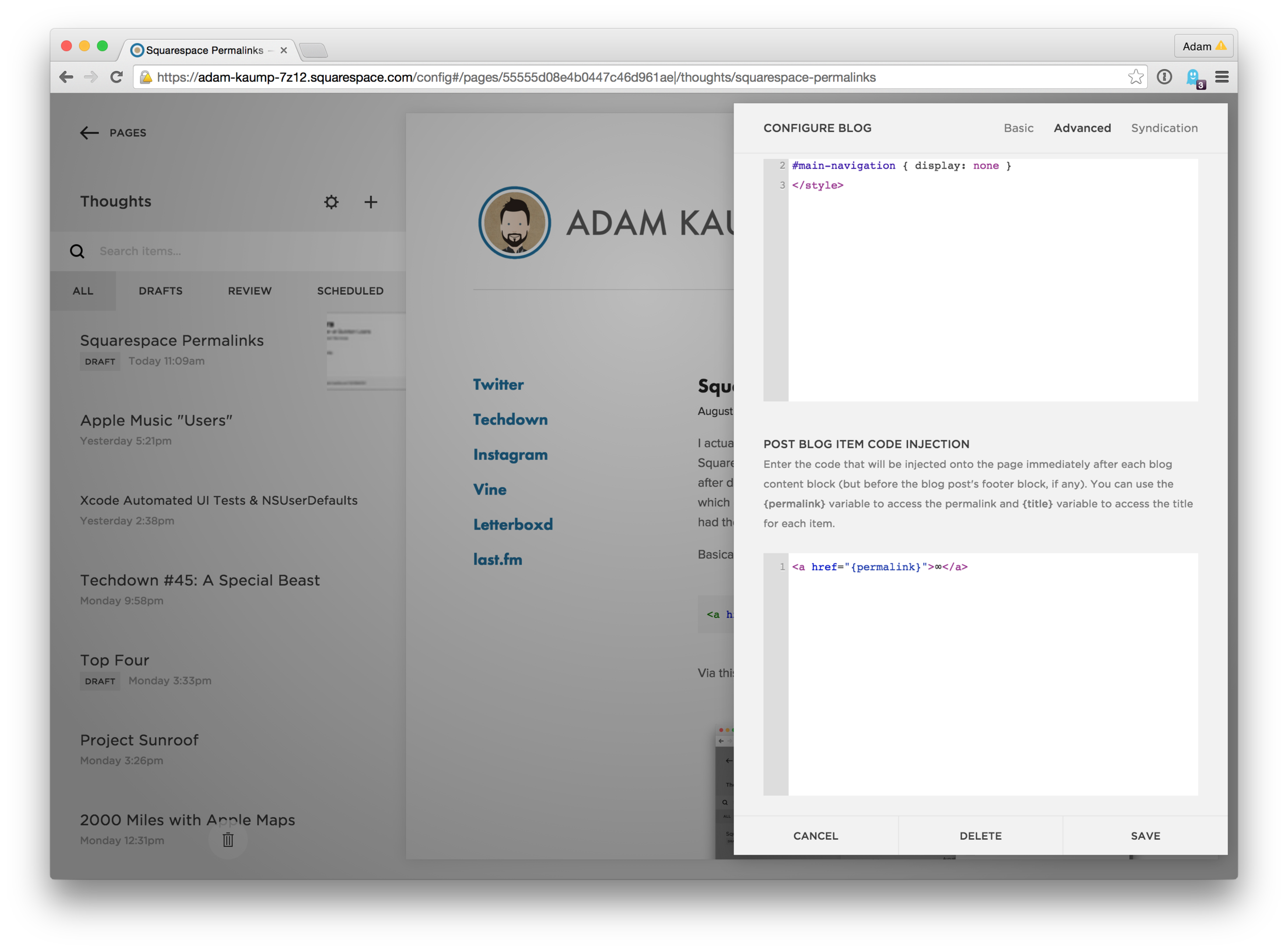
Not super complicated, but also not super obvious. It's also not the optimal solution (I'd prefer the link appear near the title of the post) but it'll do for now.

Apple Music "Users"

A bit of back and forth going on today between The Verge and Apple concerning Apple Music's user retention:

Forty-eight percent of Apple Music users have stopped using the service, while only 11 percent of iOS users have tried the streaming service so far, according to MusicWatch. The music research company conducted a survey of 5,000 US consumers about their usage and knowledge about the service. In a statement to the The Verge, Apple has denied the 48 percent retention rate, stating that 79 percent of users who have signed up for Apple Music are still using the service.

MusicWatch says 52% Apple Music retention, Apple says 79%. How much of this difference can be chalked up to Apple Music's tendency to auto-play after pairing with a bluetooth device - even if the user hasn't opened the Music app in a month?

I've "stopped" using Apple Music in favor of Spotify, which is how I'd respond in a survey. But last week I tested out Siri + Apple Music functionality by saying "Hey Siri, play some Mitch Hedberg" so I'm guessing that Apple would count me among the 78% of "active" users. I'm willing to bet I'm not the only one in this boat.

Xcode Automated UI Tests & NSUserDefaults

For an application I'm building, I use NSUserDefaults the app's desired initial screen. If it's the first launch, they should see the app's explainer slideshow. If they've seen the slideshow, the app takes them to the account creation screen. And if they've logged in before, the first thing they see is the login screen.

Everything works great. But now I want to write some automated UI tests.

The first time the tests run, everything is fine. But on subsequent runs, the app is starting on a different screen, which of course causes the tests to fail. What I really want to do is clear the NSUserDefaults every time a UI test runs.

Seems like something you'd want in the setUp method of your UI test, yeah?

import <XCTest/XCTest.h>
@implementation UITests

- (void)setUp {
    [super setUp];

    //clear all user defaults
    NSString *appDomain = [[NSBundle mainBundle] bundleIdentifier];
    [[NSUserDefaults standardUserDefaults] removePersistentDomainForName:appDomain];

    //launch
    [[[XCUIApplication alloc] init] launch];
}

- (void)testMyUIStuff {
    ...
}

But this doesn't work. You apparently can't update standardUserDefaults in an XCTest and have the application see the changes.

What does work, though, is to just clear out the defaults in the applicationDidFinishLaunching method of my AppDelegate class.

- (BOOL)application:(UIApplication *)application didFinishLaunchingWithOptions:(NSDictionary *)launchOptions {
    
    [self clearUserDefaults];
    
    return YES;
}

But the issue now is that user defaults get cleared every time the app launches, and not just when it's launched through a UI test. Obviously not what we want.

The solution I found was to write to the launchArguments property of my XCUIApplication instance in my test class, and then read that parameter in my AppDelegate class. 

UITests.m:

- (void)setUp {
    [super setUp];

    XCUIApplication *app = [[XCUIApplication alloc] init];
    app.launchArguments = @[@"isUITesting"];
    [app launch];
}

AppDelegate.m:

- (BOOL)application:(UIApplication *)application didFinishLaunchingWithOptions:(NSDictionary *)launchOptions {
    
    //ui testing setup
    if ([[[NSProcessInfo processInfo] arguments] containsObject:@"isUITesting"]) {
        [self clearUserDefaults];
    }
    
    return YES;
}

- (void)clearUserDefaults {
    NSString *appDomain = [[NSBundle mainBundle] bundleIdentifier];
    [[NSUserDefaults standardUserDefaults] removePersistentDomainForName:appDomain];
}

Now my UI tests pass consistently, my application runs properly through normal use, and life is good.

Techdown #45: A Special Beast

Been a fortnight since the last episode. Feels good to be back in the saddle. Especially since Aaron tells me about how awesome Google Flights is this week, which looks like it's going to save me a pretty penny on a flight to Las Vegas.

2000 Miles with Apple Maps

Jason Snell documents his experience using Apple Maps on the iOS 9 beta to route his trip from San Francisco to Seattle and back again. It seems like things worked pretty well for him.

For the first couple of days we were driving, my phone provided non-verbal cues when it was time to make or left or right turn. I had turned off voice assistance, but when it was time to make a left turn, the phone made a pleasant bing-bong sound. And when it was time to make a right turn, there was an equally pleasant bong-bing.

After a few days, this sound stopped, and we could never get it back, which made us all sad. My Apple Watch, however, continued to tap my wrist—thump-bump, thump-bump to turn left, tap tap tap tap tap tap tap to turn right—when it was time to turn, which I appreciated when I was driving. (As navigator, I would need to verbalize those cues so my wife would be prepared to turn.)

I took a family trip to Indianapolis a week ago, using Apple Maps to get around, and I too really appreciated the non-verbal cues. I primarily listen to podcasts while driving and in the past have shied away from using turn by turn directions because of the way that the vocal cues would play over my podcasts without pausing them.

Apparently the option to disable these vocal cues has existed since iOS 7, but now "No Voice" is the default? Or maybe it's the default if your phone is paired with a watch? At any rate, I didn't know that this option existed before, and now I can't do without it.

John Oliver: Televangelists

John Oliver's take on Televangelists and the Prosperity Gospel is, unsurprisingly, amazing.

Ocarina of Time Speedrun in 18:10

Far and away the most entertaining speedrun of a video game I've ever seen, even though it's no longer the fastest time for Ocarina of Time (it's been beaten twice in the past year). Cosmo's commentary really gives you an appreciation for how much work goes into doing speedruns like this.

There are worse ways for you to spend 20 minutes.

Two Months with an iPhone

I'm not the type to begrudge anybody based off of their cell phone choices. If you prefer an Android phone to other phones on the market for any reason, then that's great for you. The world would would be a better place if we would stop getting offended when people have different tastes.

However, this bit stood out to me, since multiple Android users have given me shit about being excited about Apple Pay when it's "something Android has been doing for years."

And Apple Pay. Man; when it was first announced, I snobbishly said Google was there first with Google Wallet. And I’m right of-course. It’s a sin that it took iOS this long to get NFC support, and a bigger sin that right now, only Apple Pay works with. That said, let me tell you how I have to use Google Wallet:

Open App -> Put in PIN -> Find Card -> Open Card -> Hold Phone to Reader

Here’s how Apple Pay Works:

Hold Phone to reader with thumb on Touch ID

That’s it. I don’t have to open any app. I just have to hold my phone to a reader. This is the way it should be.

Implementing a feature and implementing it in a usable way are two completely different things.

The Hateful Eight

I could not possibly be more excited about this mustach... I mean, movie.